
User, agent, scopes, expiry, and caps stay under your product logic.
Agent action authorization
allow deny confirm
Check whether this user authorized this agent for this scope before the action runs. Your app defines the authorization and enforces the returned decision. Allowly signs the receipt.
const check = await allowly.check({
  authorizationId, // created for this user + agent + scopes
  scopes: ["email.send"]
});

const decision = check.results["email.send"];
Runtime flow
signed receipt
allow
deny
confirm
escalate
Each sensitive action gets one concrete decision before the tool runs.
Receipts are signed, exportable, and independently verifiable.
allow
The action proceeds.
deny
The action is blocked.
confirm
Ask the user first.
escalate
Route to a human approver.
Verbs and attributes
Budget is a spend cap on active permission.
Budget lives on an active authorization. Your app sends the estimated cost for a sensitive action, and Allowly denies the check if that action would exceed the cap.
Set the cap
Add budget_limit_micros when creating the user + agent + scopes authorization.
50_000_000 means $50.00.
Estimate the action
Include estimated_cost_micros on the runtime /check before
the agent calls a paid model, API, or tool.
Get a decision
Under budget returns the normal verb. Over budget returns deny with
reason: "budget_exceeded" and a signed receipt.
1. Authorize
Create the user + agent + scopes permission record
2. Check
Call /check before a sensitive action runs
3. Prove
Keep the signed receipt for users, support, and audits
What Allowly does
Check the permission edge. Sign the result.
You define the authorization in your app: the user, the agent, and the scopes. At runtime, your app delegates each check to Allowly, enforces the returned decision, and gets a signed receipt proving what happened.
For builders
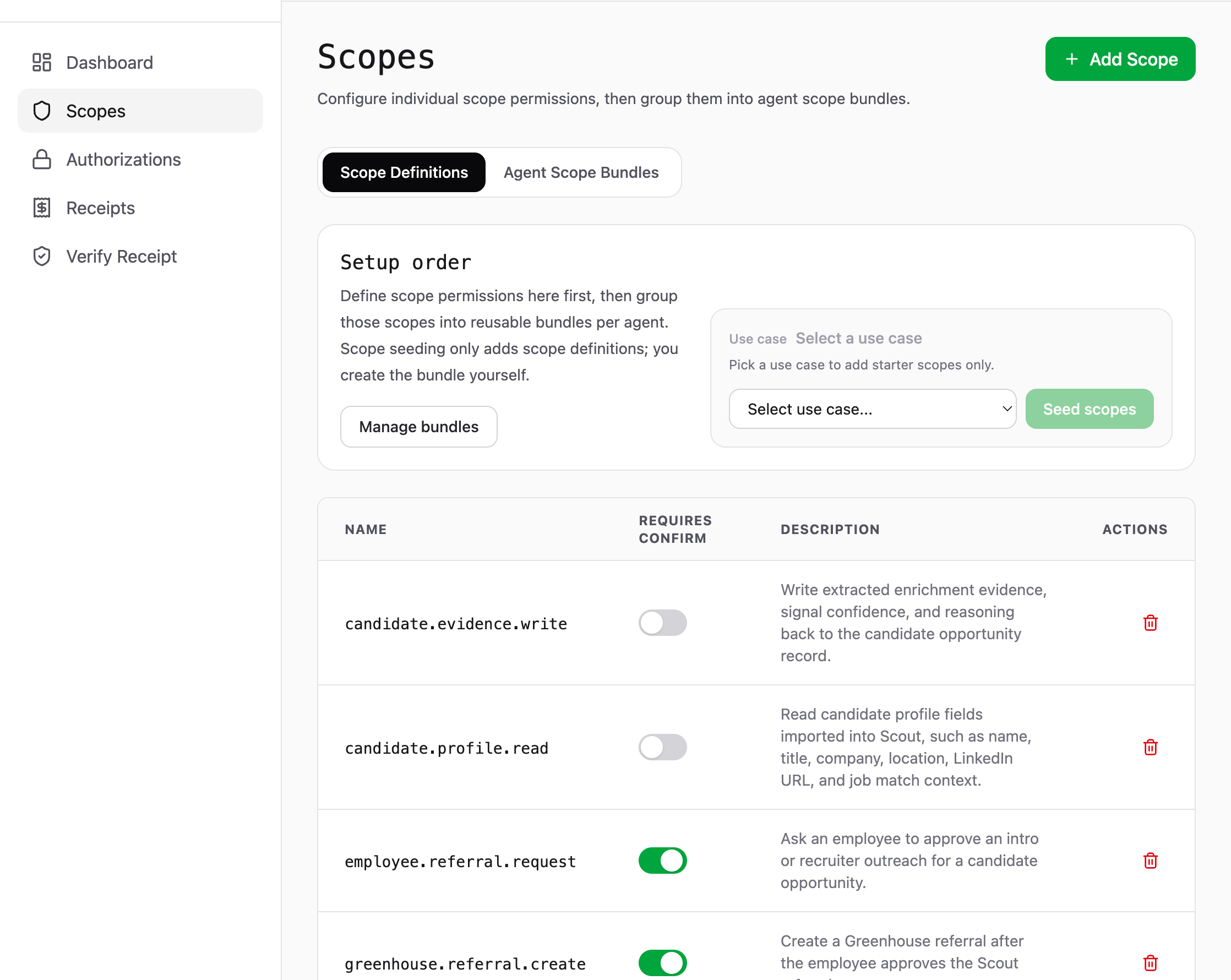
Define the agent actions your app can authorize.
Create scope definitions for sensitive actions, mark the ones that require confirmation or escalation, then group them into reusable bundles per agent.
- ✓ Keep sensitive actions behind explicit scope checks.
- ✓ Ask users to confirm high-impact actions before they run.
- ✓ Route Pro+ escalations to managers, security, or compliance.
- ✓ Reuse scope bundles across agents and workflows.
Signed proof
Every decision leaves a receipt.
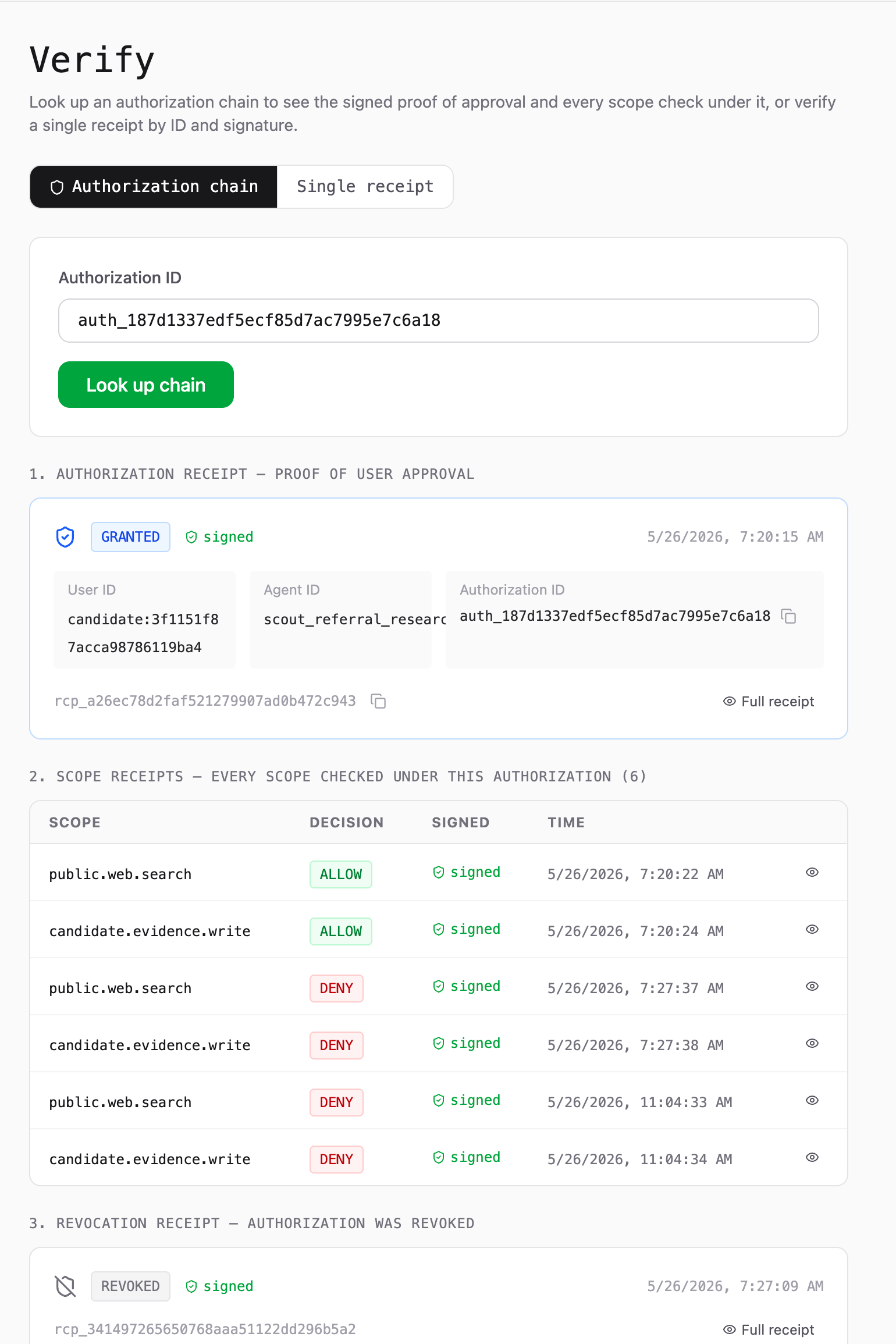
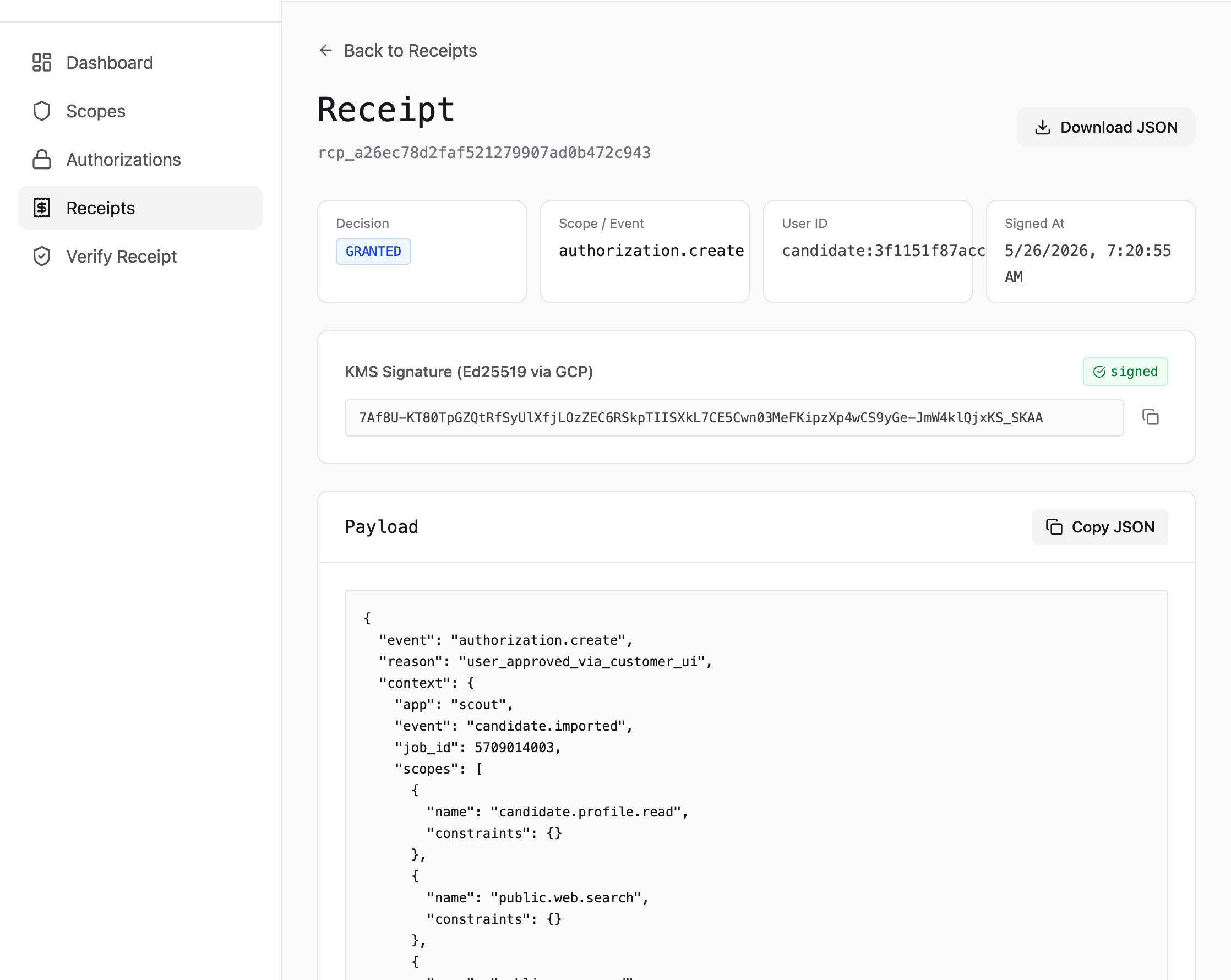
Open the receipt behind a decision to inspect the event, user context, signature, and JSON payload your team can download or verify later.
- ✓ See the exact scope or event that produced the decision.
- ✓ Keep a signed payload for support, audits, and customer questions.
- ✓ Copy or download JSON without changing your enforcement code.
Why not build it yourself?
The hard part is not the if statement.
You can add a permission check in-house. The project starts when you need the check to be consistent across multiple systems, revocable, explainable, and independently provable after the fact.
Consent snapshots
Store exactly which user authorized which agent for which scopes, and make changes auditable.
Runtime decisions
Evaluate active, revoked, expired, rate-limited, confirmed, and budgeted actions before tools run.
Cross-system control
Give web apps, workers, MCP tools, and agents the same answer for the same authorization.
Confirmation flows
Pause high-impact actions, ask the user, then allow only the approved action window.
Signed receipts
Produce tamper-evident JSON receipts that support, customers, and auditors can verify later.
Verification keys
Rotate signing keys without breaking old receipts or forcing customers to trust your database.
Developer path
Add one check before the action.
The integration point is deliberately small: call Allowly with one scope, branch on the decision, then run, pause, route, or block the action in your own app.
async function sendEmail(user, draft) {
  const check = await allowly.check({
    authorizationId: user.allowlyAuthorizationId,
    scopes: ["email.send"]
  });

  const decision = check.results["email.send"];

  if (decision.decision === "allow") {
    return gmail.send(draft);
  }

  if (decision.decision === "confirm") {
    return askUser(decision);
  }

  if (decision.decision === "escalate") {
    return routeToApprover(decision);
  }

  return blockAction(decision.reason);
}1. Check scope
Ask before the action.
Check the stored authorization against one concrete scope.
2. allow
Run the action.
The agent proceeds and the decision gets a signed receipt.
3. escalate
Route to an approver.
Pause the tool and ask the configured third party first.
4. confirm
Ask the user first.
Pause the tool and route the decision through your consent UI.
5. deny
Block the action.
Do not run the tool. Keep the reason and receipt for support.
Start here
Quickstart
Create an authorization, call /check, and fetch the signed receipt.
Runtime API
Check endpoint
Request fields, decision results, receipt envelopes, and budgeted checks.
Open API docsProof
Verify receipts
Fetch public keys and verify signed receipts offline with the SDK verifier.
Read verification docsControls
Budget attribute
Attach spend caps to authorizations and deny actions that exceed them.
Read budget docsTrust boundary
Allowly is the notary, not the actor.
Your app stays in control of the workflow. Allowly evaluates the authorization and signs the decision trail; it does not run tools, send emails, move data, or replace your product logic.
Your app owns
- User experience and consent UI
- Agent action execution
- Branching on allow, deny, confirm, or escalate
- Provider/model cost estimates
Allowly owns
- Authorization records and scope checks
- Decision reasons, confirmation nonces, and escalation IDs
- Signed receipts and public verification keys
- Receipt retention and audit lookup
SDK fallback owns
- Local timeout behavior when configured
- Explicit fallback flags for local decisions
- No signed Allowly receipt for fallback results
- Fail-closed by default
Supported integrations
SDK, CLI, MCP, or no-code.
Use Allowly in no-code workflows, MCP tools, terminal automation, or directly from your SDK of choice.

- Create authorizations
- Check steps before they run
- Branch on decisions
Community node name
n8n-nodes-allowly

- Create authorizations
- Check steps before they run
- Branch on decisions
Integration slug
zapier-allowly

- Create authorizations
- Check steps before they run
- Branch on decisions
Custom app slug
make-allowly-app

MCP
- Guard tool calls
- Resolve authorization
- Return decision receipts
Middleware install
npm install @allowly/sdk @modelcontextprotocol/sdk

TS SDK
- Create authorizations
- Run checks
- Verify receipts
Node install
npm install @allowly/sdk

Python SDK
- Create authorizations
- Run checks
- Verify receipts
Python install
pip install allowly

CLI
- Setup workspace
- Manage credentials
- Script checks
Global install
npm install -g @allowly-ai/cli
Pricing
Start free. Upgrade when agents reach production.
Signed receipts are included in every tier. What scales is check volume, decision types, production controls, retention, export, and regulated deployment support.
Coming soon: expiry windows and additional approval patterns.
Free
$0
For trying Allowly on one agent.
- 5k checks / month
- 1 agent
- allow · deny · confirm
- 7-day receipt retention
Starter
$9/mo
For small teams and demos.
- 25k checks / month
- 3 agents
- allow · deny · confirm
- 90-day receipt retention
- Email support
Pro
$99/mo
For production AI agents.
- 1M checks / month
- Unlimited agents
- allow · deny · confirm · escalate
- Budget attribute spend caps
- 1-year receipt export
Enterprise
Contact us
For regulated and high-scale teams.
- Custom checks and retention
- Dedicated or self-hosted
- All decision types + custom
- BAA, residency, SLA, SOC2 docs
- Dedicated onboarding
| Feature | Free | Starter | Pro | Enterprise |
|---|---|---|---|---|
| Price | $0 | $9/mo | $99/mo | Contact us |
| Checks | 5k/mo | 25k/mo | 1M/mo | Custom |
| Agents | 1 | 3 | Unlimited | Unlimited |
| Decisions | allow · deny · confirm | allow · deny · confirm | allow · deny · confirm · escalate | All + custom |
| Budget attribute | — | — | Spend caps | Custom spend controls |
| Receipt retention | 7 days | 90 days | 1 year + export | 7yr+ custom |
| Signed receipts | ✓ | ✓ | ✓ | ✓ |
| Hosting | Shared | Shared | Shared | Dedicated / self-hosted |
| Data residency | — | — | — | EU / custom |
| BAA | — | — | — | ✓ |
| SLA + uptime | — | — | — | ✓ |
| SOC2 docs | — | — | — | ✓ |
| Integrations | n8n · Zapier · Make · MCP · SDK | n8n · Zapier · Make · MCP · SDK | n8n · Zapier · Make · MCP · SDK | + custom |
| Support | Community | Priority email | Dedicated + onboarding | |
| Best for | Trying Allowly | Small teams | Production agents | Regulated orgs |
About Allowly™
Managed paper trail for agent actions.
Allowly™ helps product and engineering teams put runtime permission checks in front of AI-agent actions, then keep a signed paper trail for what happened.
The core idea is simple: agents don't grant themselves permission. You set the authorization in your app: the user, the agent, the scopes. At runtime, your app delegates each check to Allowly and enforces the decision that comes back. Allowly keeps a signed record of every decision, so you can show users what their agents did, help support resolve disputes, and answer auditors.
You can build checks in-house, but the hard part is the independent paper trail. Allowly acts like a notary for agent actions: a separate permission layer that signs what was allowed, denied, confirmed, escalated, or blocked by a cap after your app enforces it.
Wire the first check
Start with one action. Keep the receipt.
Start on Free, wire one permission check in minutes, and keep a signed record from your first real user flow.